










Academic Standards
Objectives
- Draw Color Codes to program their bot to move at different speeds.
- Observe how their bot changes speed after it follows a Color Code.
- Connect the input of a sequence of color with the output of a speed.
Materials
Per Student
Ozobot
Color Code Markers
Intro to Color Codes 02: Speed Activity Sheet (1 page)
Pencil
Direct Instructions
Introduction to Activity
Use the instructional video to guide your students through the activity. Alternatively, continue with the direct instructions below.
Ask students if they knew Ozobot can move at six different speeds and they can tell Ozobot how fast or how slow to move. Tell students they will explore how to draw the Speed Color Codes and watch the six different speeds in action!
Introduction to Speed Color Codes
Review the definition of Color Codes with your students and introduce them to the concept of speed. Explain to students they can tell their bot what to do. They can't speak to it like they would a pet or their little brother, but they can tell it what to do using sequences of color. Sequences of colored blocks found along a black line that give instructions to your bot are called Color Codes. First, your bot reads inputs or receives information from the different sequences of color it travels over. Then, your bot processes the instructions and performs an output or action. Tell students that the Color Codes they will explore today control the speed of their bot. Speed is the measurement of how fast an object moves. Speed is measured by the rate at which an object covers a distance. Tell students that they will explore six different speeds and watch their bot accelerate. Acceleration happens when an object changes speed, changes direction, or both.
Use Color Codes to Complete the Path
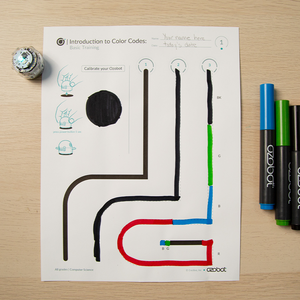
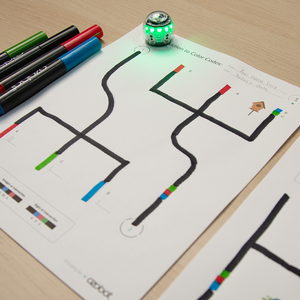
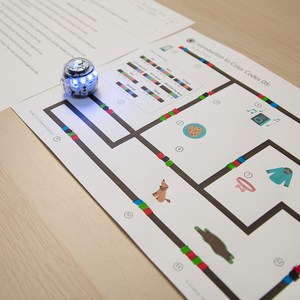
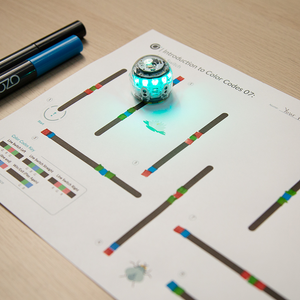
Guide students to look at the Speed Map. Ask them to find the Color Codes Key. Explain that there are six Speed Color Codes numbered 1-6. Now, have students look at the pathway their bot will travel along. Explain that there are six missing Color Codes also numbered 1-6. They will use the Color Codes Key to put the missing Color Codes into the pathway and trace the rest of the line with black marker.
Optionally, model for students how to fill in the map. The first missing Color Code is Short Super Slow. Add the color sequence R,G,B for number 1. The next missing Color Code is Slow. Add the color sequence R,BK,R for number 2. Finally, use your black marker to trace over the pathway to make sure every Color Code is between two black lines.
Have students use the Color Codes Key and their Color Code markers to fill in the six missing Speed codes on their map and trace the rest of the path black.
Run Your Bot on the Path from Start 1
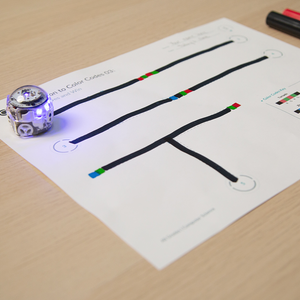
After the students have completed their map, they are ready for their bot! Tell students that they will put their bot on start number 1 and observe how it uses its line sensor to follow the pathway and its color sensor to process each Color Code. Each Color Code will give their bot a different set of instructions. Challenge students to see if they notice how each Color Code instructs or programs their bot to move at a different speed along the path.
Analyze the Color Codes
Ask students if they noticed any changes in speed as they watched their bot. Were they able to tell when their bot received instructions. Have students watch your bot in action. Put your bot on start number 1. Explain to students that as the bot moves over the Color Code, R,G,B the LED light on top changes color to match the sequence. This lets you know the bot has recieved the first instruction or program. Next, the bot follows the instructions and moves at a super slow speed. Then, the bot continues to follow each Color Code increasing in speed all the way to the end of the path.
Run Your Bot on the Path from Start 2
Tell students that they will continue to explore the Speed Color Codes. This time, they will put their bot on start number 2 and observe how it uses its line sensor to follow the pathway and its color sensor to process each Color Code. Remind students each Color Code gives their bot a different set of instructions. Challenge students to find out if the direction their bot moves changes the order of its speed.
Analyze the Color Codes
Ask students if they noticed any differences in the speed as they watched their bot move along the pathway. Tell students that two of the Speed Color Codes are asymmetric codes that program the bot to perform different actions when read from different directions. Have students watch your bot in action. Put your bot on start number 2. Explain to students, now that the bot is traveling in the opposite direction, Color Code number 6 becomes R,G,B and instructs the bot to move super slow instead of a nitro boost. Next, the bot increases in speed when it is programmed by the Turbo Color Code. Then, it begins to decrease in speed until reaches Color Code number 1. Since the bot is traveling in the opposite direction, Color Code number 1 becomes B,G,R and instructs the bot to move quickly with a nitro boost.
Optional Extension
Looking for more?
Have students take their bot on a road trip! On a blank sheet of paper, have students draw their own pathway and use Color Codes to program their bot to change speed as it moves from the start to its final destination.
Lesson Wrap-Up
Optionally, choose one of the formative assessment suggestions below to check the understanding of your students.
Have students explain to a partner, in writing, or in a group discussion:
- the Color Codes they used and why
- a problem they encountered and how they attempted to solve it
- how their bot behaved based on the Color Codes used and if the bot demonstrated the correct outcome
Student Instructions
Did you know Ozobot can move at six different speeds and you can tell Ozobot how fast or how slow to move? Explore how to draw the Speed Color Codes and watch the six different speeds in action!
Look at the Speed Map. Can you find the Color Codes Key? There are six Speed Color Codes numbered 1-6. Now, look at the pathway your bot will travel along. There are six missing Color Codes also numbered 1-6. The first missing Color Code is Short Super Slow. Add the color sequence R,G,B for number 1. Use the Color Codes Key to put the other missing Color Codes into the pathway. Then, trace the rest of the line with black marker.
You are ready for your bot! Put your bot on Start 1 and watch how it uses its line sensor to follow the pathway and its color sensor to process each Color Code. Remember each Color Code gives your bot a different set of instructions. See if you notice how each Color Code instructs or programs your bot to move at a different speed along the path.
As you watched your bot move along the pathway, did you see any changes in speed? Were you able to tell when your bot got instructions? As your bot moved over the Color Code, R,G,B the LED light on top changed color to match the sequence. This lets you know your bot got the first instruction or program. Next, your bot followed the instructions and moved at a super slow speed. Your bot followed each Color Code increasing in speed all the way to the end of the path.
Explore the Speed Color Codes some more! Put your bot on Start 2 and watch how it uses its line sensor to follow the pathway and its color sensor to process each Color Code. Remember each Color Code gives your bot a different set of instructions. See if the direction your bot moves changes the order of its speed.
As you watched your bot move along the pathway, did you see any differences in the speed? Two of the Speed Color Codes are asymmetric codes that program the bot to perform different actions when read from different directions. When your bot traveled in the opposite direction, Color Code number 6 became R,G,B and told the bot to move super slow instead of a nitro boost. Color Code number 1 became B,G,R and told the bot to move quickly with a nitro boost.
Way to go programming your bot to change speed!
Make sure your work is complete.
Did you fill in the missing Speed Color Codes on the pathway?
Did you run your bot from Start 1 and Start 2?
Can you tell how the speed of your bot changed as it moved along the pathway?
Can you tell which Color Codes program your bot to move slowly?
Can you tell which Color Codes program your bot to move quickly?
Looking for more?
Take your bot on a road trip! On a blank sheet of paper, draw your own pathway and use Color Codes to program your bot to change speed as it moves from the start to its final destination.
Teacher Tips
The worksheets for this lesson are compatible with Bit. For supporting students with color vision deficiency and/or visually impaired students, allow them to utilize Color Codes Chart and inform the student(s) that the colors are labeled under each color segment. Be sure to label any Color Codes in these lesson materials so that they correspond to the Color Codes Chart. Use masking tape to label Color Code markers your student will use.
Lesson Closure
Use the Completion Checklist to evaluate your student’s work. Suggested ways to use the checklist: Have students use the Completion Checklist to analyze their own work. Pair students and have them analyze each other’s work using the Completion Checklist. Have students present their work to the class and allow the class to give feedback using the Completion Checklist.
Completion Checklist Did you fill in the missing Speed Color Codes on the pathway? Did you run your bot from Start 1 and Start 2? Can you tell how the speed of your bot changed as it moved along the pathway? Can you tell which Color Codes program your bot to move slowly? Can you tell which Color Codes program your bot to move quickly?