









Academic Standards
Objectives
- Name a function and define the set of actions.
- Code a program that mimics multiple behaviors and includes a function.
- Call at least one function.
Materials
Per Group
Ozobot
Device for Ozobot Blockly or Ozobot Editor
Per Student
Functions Planning Sheet
Pencil
Prerequisites
- Completed Lesson
Intro to Ozobot: Get to Know Evo https://ozo.bot/evo
- Completed Lesson
Intro to Ozobot Blockly 01: Basic Training https://ozo.bot/ob1a
Direct Instructions
Tap into students' prior knowledge by asking them about types of behaviors they were able to program with Color Codes.
Explain that functions are a single name for a set of actions. They can think of functions like a file cabinet. Each drawer has a label and inside the drawer, there are several files. With functions, each one has a name or label. Inside that function are several actions. In a program, we call a function when we want that group of actions to run. Tell students they will write multiple functions and use them in a single program.
Ask students what behaviors a singer might display while performing onstage. If needed, brainstorm some famous singers that students could choose to mimic. Have students choose one singer to focus the project on.
Display a blank Functions Planning Sheet and model how to complete the page. Model how moonwalk, dance, and sing would be fitting for function names. Fill out potential behaviors, and model how to explore Ozobot Blockly or Ozobot Editor for blocks that could be used. With Ozobot Blockly or Ozobot Editor a broader variety of options are available versus Color Codes.
Note: While the Functions category of blocks lives in Levels 4 and 5, allow students to use and explore blocks in the lower levels also. They will likely find that the movement blocks in Level 3 will be more easily utilized. Explain to students that they can use blocks from any level that make sense for their code.
Model how to create the first function. From Level 4 Functions, add a to do something block to the workspace. Change the name do something to moonwalk.
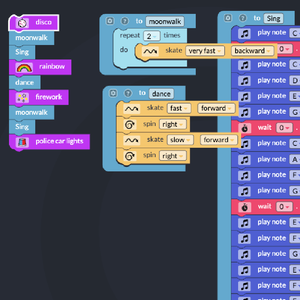
What type of behavior would the Ozobot display if it was mimicking a singer moonwalking? Model how to build the code.
Note: If your students are interested, you could show them camelCase which is a way that programmers save names for files, functions, etc. In programming languages, spaces are not allowed in function names, but names need to be descriptive. That's why we use camelCase. The first word can be lowercase, but each following word is capitalized, for example, goStraight, makeAUTurn, twoMinuteDance.
If we try running the program, Ozobot doesn't do anything. We built the function, but for the bot to execute the code, we must CALL the function. Do this by dragging out the corresponding block in the function category. I named my function moonwalk, so I drag out the moonwalk block. Note that this block doesn't appear until I name my function.
With the moonwalk block in the workspace, we can test the program. Go to Programs in the right-hand menu and connect your bot. Once connected, click Run Program.
Build the dance and sing functions with the students, or allow them to build their own.
Note: the sing function example shows a possibility, but this level of complexity is not expected. The blocks in the example are from Level 5 and are more sophisticated than students may be ready for but show the possibilities. Encourage students to choose sound blocks that make sense to them or allow them to copy the example.
Now that students have three functions on the workspace, they can call them in any order they like or multiple times. Model how to build a program by calling functions. Remind students that when they call a function, all the blocks inside that function will run.
Model running the program, and ask students how functions made it easier to code.
Display the Functions Planning Sheet and explain that students will create a program using functions. Review the steps on the Planning Sheet and set expectations for the student planning process. Allow students to choose a subject, or make their own version of the singer program.
When students have completed the activity, ask them to complete the reflection sheet either verbally with a partner or in writing.
Optional Extension
The extension includes an opportunity for students to code a song by using nested functions. Display the sample code and lead a discussion around the chorus of the song.
Song URL: Ozobot Blockly: https://ozo.bot/b/qwcppb or use Share Code qwcppb
Ozobot Editor: https://editor.ozobot.com/blockly?programId=kqf7aks or use Share Code kqf7aks
Some parts of the above song repeat. Students can write a function that calls another function. In this case, the beginning notes of the song repeat near the middle of the progression. Calling functions simplifies code as the other option requires rewriting existing code. For this optional extension, the goal is to write a function that calls another function.
Student Instructions
What is a function in programming? A function is a way to group code to make repeating sections easier to manage. For example: a filing cabinet is a place to store paperwork. Each drawer of the filing cabinet has a label or name that describes the paperwork inside. This is the same with functions. Each function is labeled with a name that describes the code inside the function.
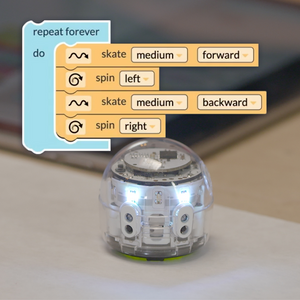
Look at the image with this instruction. If we were reading it like an English sentence, it would say "to dance means to skate fast forward, spin right, then skate slow forward, and finish with a spin right." Dance is the label of the function. If we look in the functions category in Ozobot Blockly, there is a block that says dance. When this block is added to a program, we are calling the function. That means when we run the program, the blocks inside the dance function will run.
You will start by planning three different functions on the Functions Planning Sheet. This lesson focuses on moves a singer might do when performing on stage. Your three functions might be called dance, sing, and moonwalk, or you can choose other descriptive names.
Complete your Functions Planning Sheet.
To code your first function, go to Level 4 Functions in Ozobot Blockly or Ozobot Editor. Add a to do something block to the workspace. Click on do something and rename your function. Add blocks from your plan to the inside of the function.
Go back to the Functions category and find the block with the new name of the function you just created. Add that block to the workspace.
Connect your bot and run your program. Your new function should run. Debug as necessary.
Repeat Step 2 above two more times, so you have three functions on your workspace. Be sure you have tested each function.
Write a complete program by adding other blocks from the Ozobot Blockly or Editor levels of your choice and calling the functions you created. Test and debug your program as needed.
Share your program with your group or class. Then, answer the questions on the Reflection page.
Teacher Tips
- This lesson can be completed in 60-90 minutes, but feel free to extend the time if students are invested in writing and creating more elaborate codes and functions.
- While the Functions category of blocks lives in Levels 4 and 5, allow students to use and explore blocks in the lower levels as well. They will likely find the movement blocks in Levels 2 and 3 easier to use.
- If students have trouble coming up with an idea for their program, hold a brainstorming session before releasing them to work independently. Some ideas include racecar, bunny, ballerina, breakdancer, snake, and dog.
If you are using Evo, create your program at https://ozoblockly.com/editor. The sample solution can be accessed here:
https://ozo.bot/b/z3xhsa or use Share Code z3xhsa
If you are using Ari, create your program at https://editor.ozobot.com/blockly. The sample solution can be accessed here:
https://editor.ozobot.com/blockly?programId=zxkx5gg or use Share Code zxkx5gg
Lesson Closure
Initiate a discussion by asking students: Why was it helpful to use functions? How did using functions make it easier for you to code? When did it make sense to use a function? When did it not make sense to use a function?